Ready
Dashboard Templates: Build Once, Scale to Every User
Managing dashboards at scale is one of those problems that sneaks up on you.
You start with five users. You build five dashboards, each showing the same layout, the same chart types, the same time-series widgets. The only thing different is whose devices are displayed. Three weeks later you have thirty users, and someone is asking why dashboard 17 is missing a widget that all the others have. You check, and sure enough, you forgot to add it when you duplicated the last one.
Multiply that by a hundred users, add a few layout changes to roll out, and you have a maintenance problem that scales linearly with your deployment.
Dashboard templates are how we solve this in Magistrala.
What Dashboard Templates Actually Do
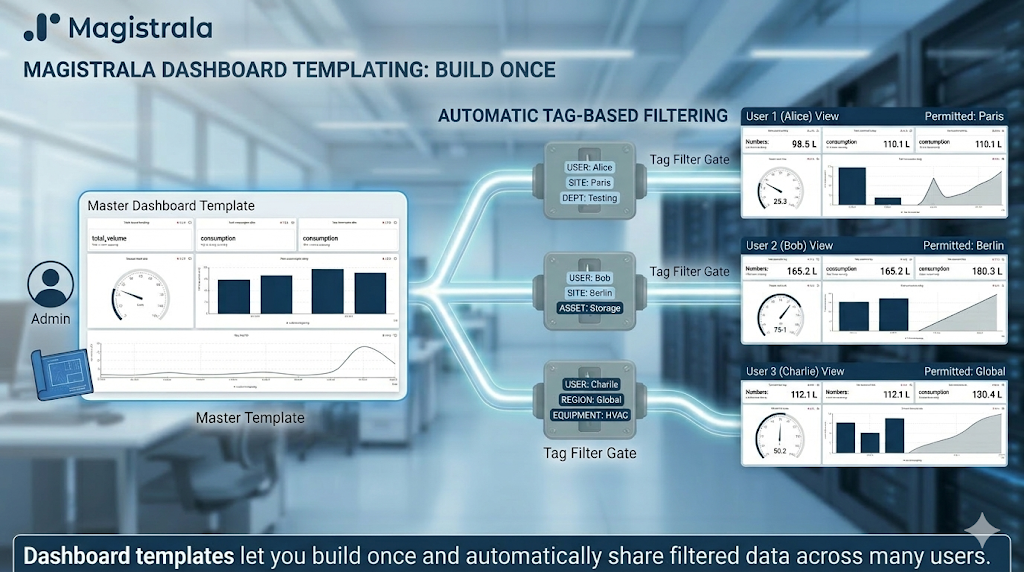
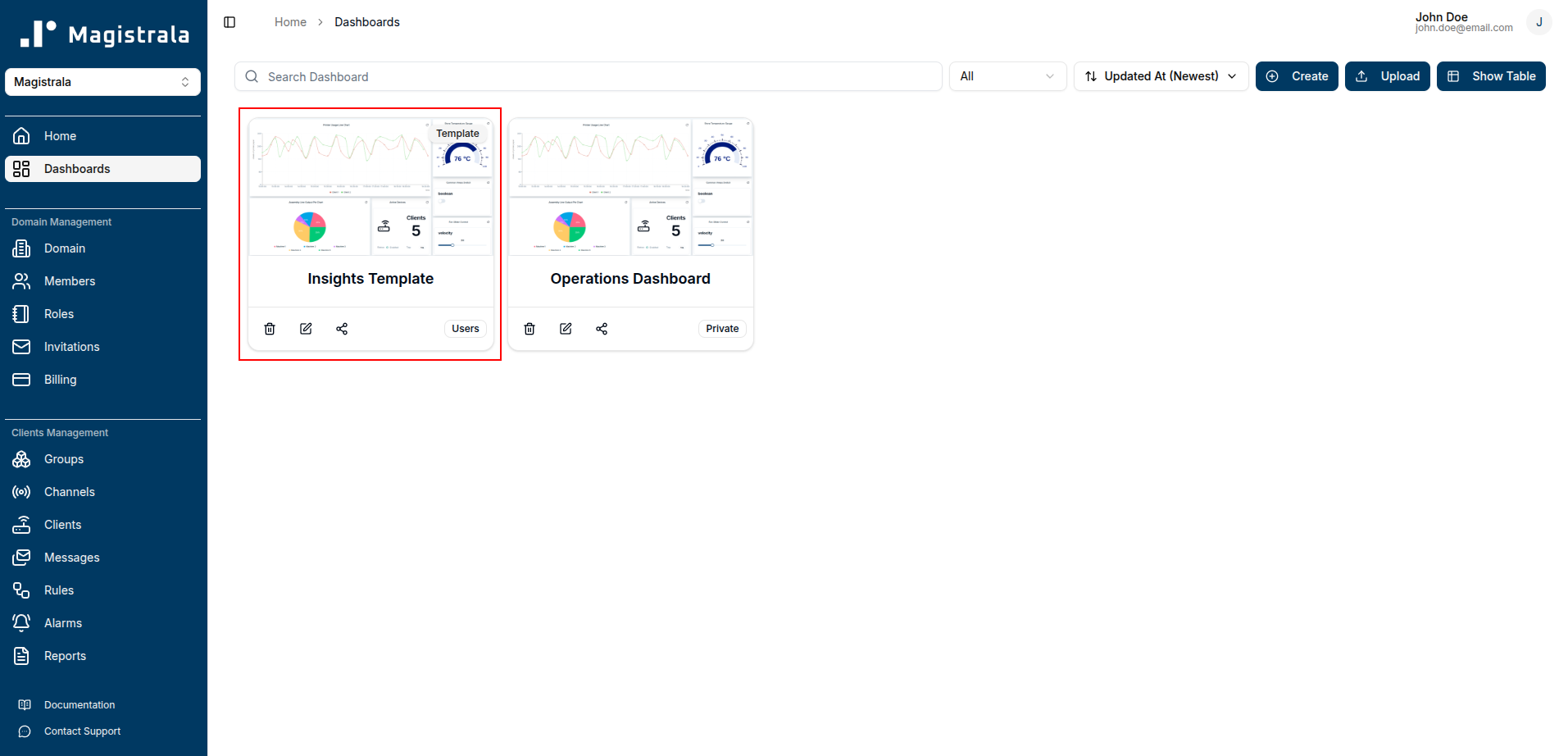
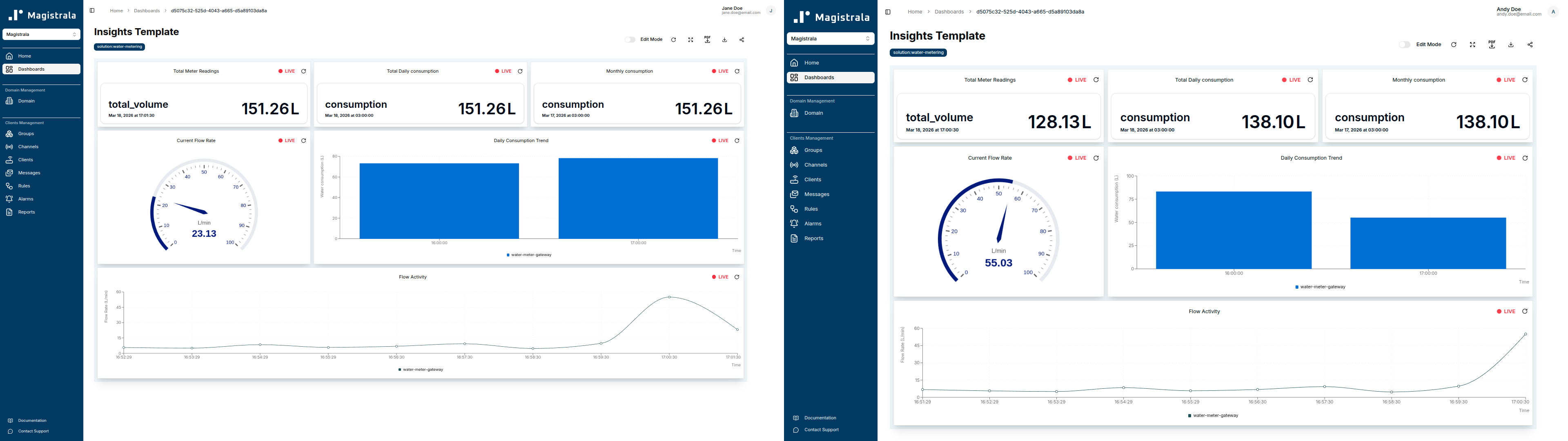
The idea is straightforward: you build one dashboard and share it with many users. Each user opens the same template with the same widgets, the same layout, the same visual structure, but what they see inside those widgets is filtered to their own data.
The filtering is driven by tags. When a user opens a templated dashboard, Magistrala looks at the tags defined on each widget and finds the entities (clients, channels, groups) that belong to that user and match those tags. The widget then queries and displays data only from those matched entities.
So a “device temperature” chart on the template becomes a “temperature from my assigned device” chart for every individual user, without you having to wire it up separately for each one.
This is the core mechanic: a single source of truth for layout and configuration, with per-user data scoping handled automatically at render time.
How the Tag Matching Works
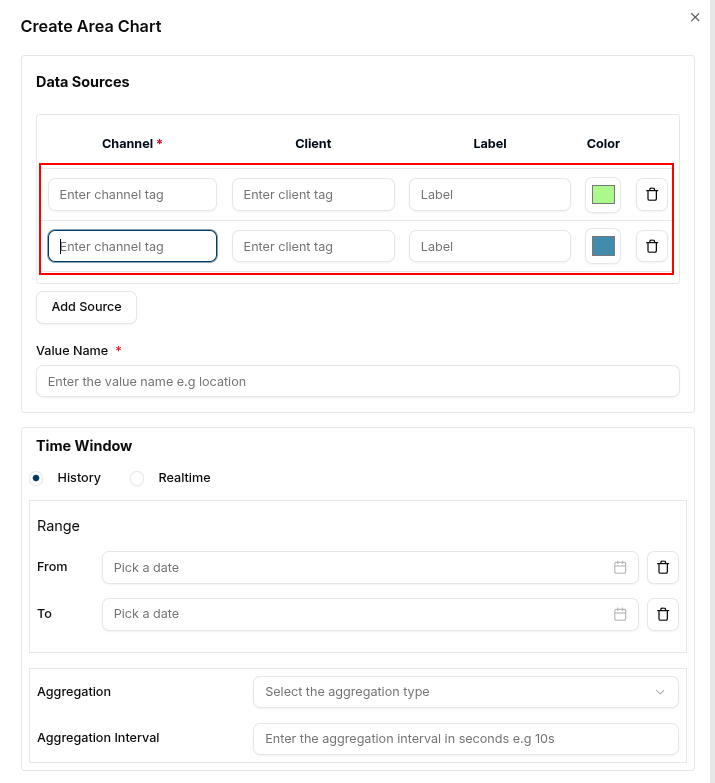
When you build a dashboard template, widgets are configured with tags rather than hard-coded entity references. A tag might be something like section-a, building-3, or meter-east. These tags are how the system resolves which data to show each user.
When a user loads the dashboard, Magistrala finds the entities that the user has access to and that carry the widget’s tag. The widget then uses those entities as its data source.
There’s one constraint worth understanding upfront: the system expects one entity per tag per user. If a user has multiple entities sharing the same tag, only the first one is used. This is a deliberate simplicity trade-off. The template model is built around the assumption that each tag maps to a single, unambiguous entity for a given user. If your deployment has situations where multiple devices carry the same tag for the same user, you’ll want to think about your tagging scheme before you build templates around it.
The practical takeaway: design your tags to be specific enough that they point to a single entity per user. Think of tags as “roles” or “slots” in the dashboard (primary-meter, floor-sensor, assigned-pump) rather than broad categorical labels.
The Operational Benefit
Let’s be concrete about what this saves.
Without templates, adding a new widget to every user’s dashboard means touching every individual dashboard. Even with copy-paste or scripting, you’re working against a growing list of objects. Removing a widget means the same. Changing the time range on a chart? Every dashboard.
With templates, that work happens once. You update the template, and every user who opens their dashboard sees the updated version. There’s no rollout step, no list of dashboards to track down, no version drift between users who got the update and those who didn’t.
For deployments with dozens or hundreds of users all looking at variations of the same operational data, this shifts dashboard management from something that compounds over time to something that stays flat.
Who This Is Built For
Field Technicians by Section
A common industrial setup: you have a facility divided into physical sections (production lines, floors, zones, whatever makes sense for your environment). Each technician is responsible for one section, with their own assigned set of sensors and devices.
With dashboard templates, you build the technician dashboard once. Each technician’s view shows temperature, pressure, status, and any other operational metrics, pulled from the devices tagged to their specific section. They log in and immediately see their equipment. You never have to create a separate dashboard per technician.
When you onboard a new technician and assign them to a section, the template works for them on day one. No dashboard provisioning step needed.
Customer Portals for Utility Management
Water meter management is a good illustration of where this pattern gets interesting at a larger scale. In a building or campus deployment, each tenant or unit has their own meter. The property manager might have a hundred or more.
Rather than giving every tenant access to all meters, you can issue them a login scoped to their own meter (tagged specifically to their unit) and share the consumption dashboard template. They see their own usage data, their own readings, their own history. You manage one template. The data filtering handles the rest.
This extends naturally to any scenario where you’re running a service that customers interact with through a portal: energy monitoring, environmental sensors, equipment leasing, predictive maintenance subscriptions. The pattern is the same in each case: scoped access through tags, consistent experience through templates.
Setting Up a Template
The workflow for building a templated dashboard in Magistrala UI is fairly close to building a regular dashboard, with one key difference: instead of selecting specific entities when you configure a widget, you assign tags.
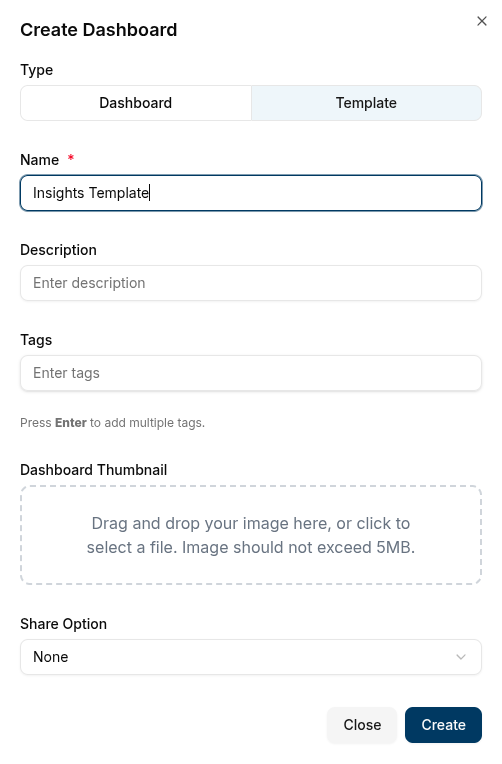
You create the dashboard, add your widgets (charts, gauges, tables, status indicators), and for each one, specify the tag that identifies the entity it should pull from. Save that as a template and share it with users.
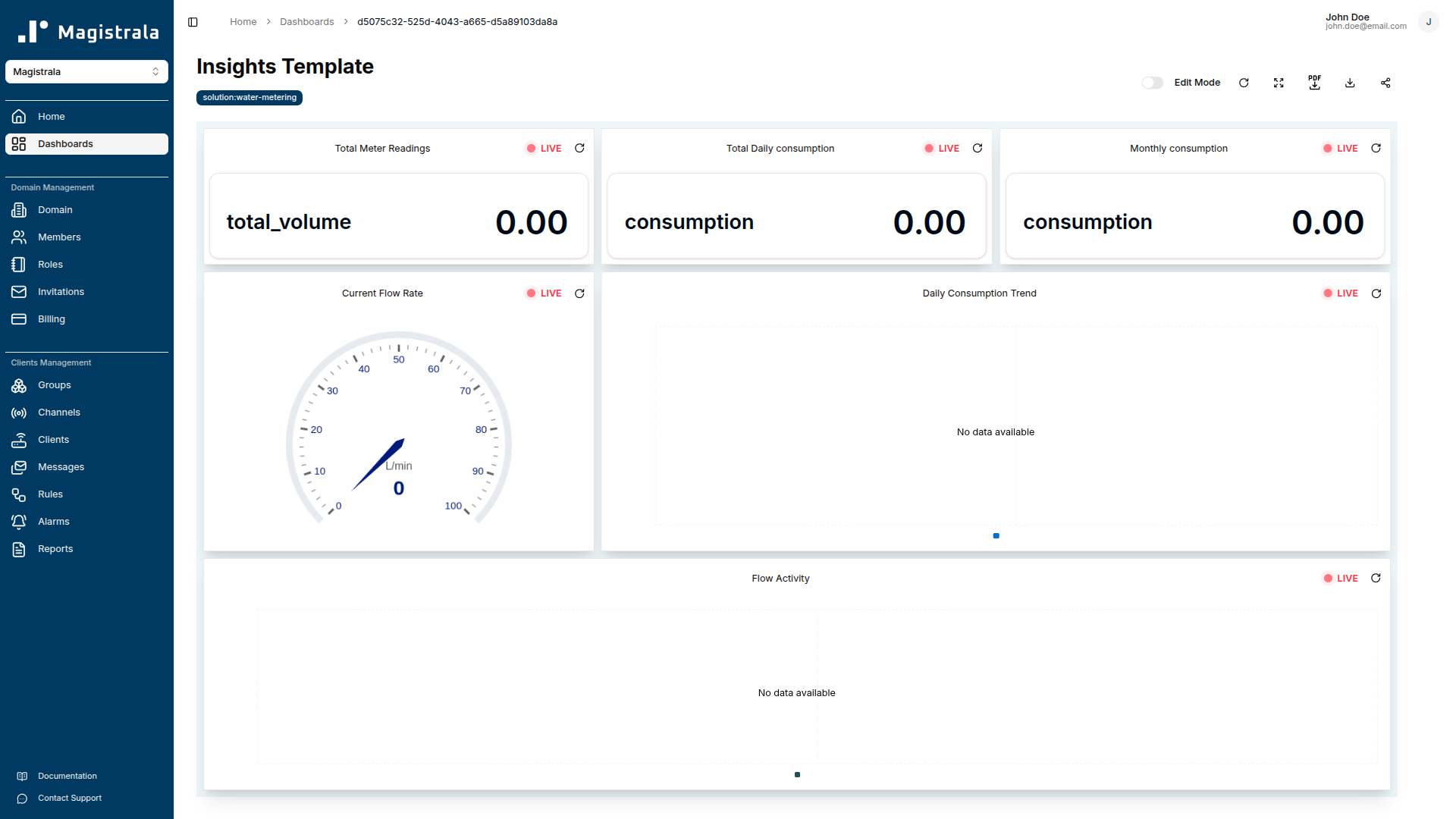
When those users open it, the resolution happens behind the scenes. Magistrala matches the tag to their accessible entities and renders the widget with their data. From the user’s perspective, they just see a dashboard that shows their stuff.
What to Think About Before You Build
A few things worth getting right before you start creating templates:
Tag design matters. Since the system uses one entity per tag per user, your tags should uniquely identify the “role” of a device in the context of a dashboard. Avoid generic labels that multiple devices might share. If you’re building a technician dashboard and a technician can be assigned to exactly one pump, a tag like assigned-pump is precise. A tag like pump is not.
Access control is still the foundation. Tags control which entity a widget resolves to, but the user still needs proper access to that entity. Dashboard templates don’t bypass Magistrala’s authorization model. They work within it. Make sure users are provisioned with the right permissions before expecting the template to surface data.
Templates are for shared structure. If two users need genuinely different layouts or different widget sets, that’s two templates, not one. Templates are best applied to groups of users who are doing the same job with different data, not users whose workflows differ.
Where to Go From Here
Dashboard templates are an enterprise feature because the problems they solve are enterprise problems: large user counts, consistent operational views, centralized management of a distributed deployment. If you’re building an IoT solution that will eventually need to onboard many users with scoped access to their own data, building your dashboard strategy around templates from the start is considerably easier than retrofitting it later.
The concrete benefits are worth stating plainly. You stop creating dashboards per user. You manage one layout instead of many. Every user gets a consistent experience. New users are onboarded without a dashboard provisioning step. And when something needs to change, you change it once.
If you want to dig into the specifics, the Magistrala documentation covers dashboard templates in detail, including how to set up tag-based data sources and configure sharing.
Dashboard templates are part of Magistrala’s enterprise offering. If you’re evaluating Magistrala for a multi-user or multi-tenant deployment and want to talk through your use case, reach out to us and we’ll help you figure out whether this fits what you’re building.
One more thing worth mentioning: we’re working on solution packs. The idea is that you’ll be able to install a pre-built solution (a complete set of dashboards, widgets, and configuration for a specific use case) directly from the platform, rather than assembling everything from scratch. What currently takes hours of setup gets reduced to minutes. We’ll have more on that soon.