Ready
One of the hardest problems in industrial IoT is not connecting devices to the cloud, it’s managing what happens at the edge after deployment.
You have a device running Node-RED in the field. Everything works. Then requirements change: you need to update the flow logic, add a new sensor, or fix a bug. Without physical access or an open SSH port, that change becomes a project.
This post shows how Magistrala Agent solves that problem by letting you remotely deploy and update Node-RED flows, either via its local HTTP API or from the Magistrala cloud over MQTT, demonstrated end-to-end with a local mock Linux device and the Magistrala cloud.
What We’re Building
A local mock Linux device (Docker Compose) that simulates an edge gateway running:
- Magistrala Agent: connects to Magistrala cloud MQTT, manages Node-RED
- Node-RED: runs data pipelines, publishes SenML telemetry
- NATS: internal message bus between agent services
Connected to the Magistrala cloud which receives telemetry, stores it via the Rule Engine, and sends commands back down to the device.
Why Agent + Node-RED?
Node-RED is excellent for visual flow-based IoT pipelines. But once deployed, updating flows typically requires direct access to the device (Node-RED UI on port 1880, which you don’t expose publicly).
Magistrala Agent bridges this gap. It acts as a secure proxy for Node-RED management, receiving commands from the Magistrala cloud over the same encrypted MQTT channel already used for telemetry, then forwarding them to Node-RED’s local REST API.
This means you can:
- Deploy new flows to any device from anywhere
- Fetch and inspect the currently running flows
- Check Node-RED’s health and runtime state
- Add individual flow tabs without replacing all flows
All without opening any additional ports or a VPN.
Setting Up the Mock Device
1. Provision Magistrala resources
With a running Magistrala instance (cloud or self-hosted), provision the required resources using a Personal Access Token:
export MG_PAT=<personal-access-token>
export MG_DOMAIN_ID=<domain-id>
make run_provision
The provisioning script creates:
- A Magistrala Client (device identity + credentials)
- A Channel
- A Client-Channel connection
- A Bootstrap configuration
- A Rule Engine rule with
save_senmloutput
All provisioned variables are written directly to docker/.env.
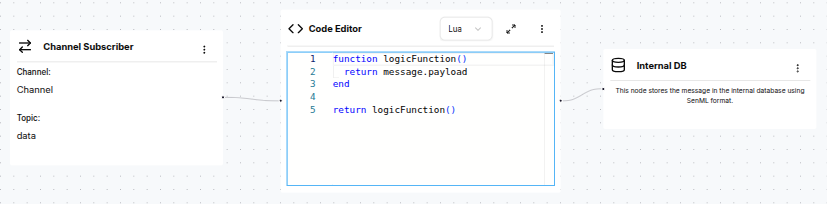
The rule subscribes to the data subtopic on the channel and passes every incoming message straight to Magistrala’s Internal DB in SenML format.
2. Start the stack
make all && make docker_dev
make run
This starts Agent (:9999), Node-RED (:1880), and NATS (:4222) in Docker.
The Node-RED instance ships with a default flow that immediately begins publishing simulated temperature and humidity readings to Magistrala every 30 seconds:
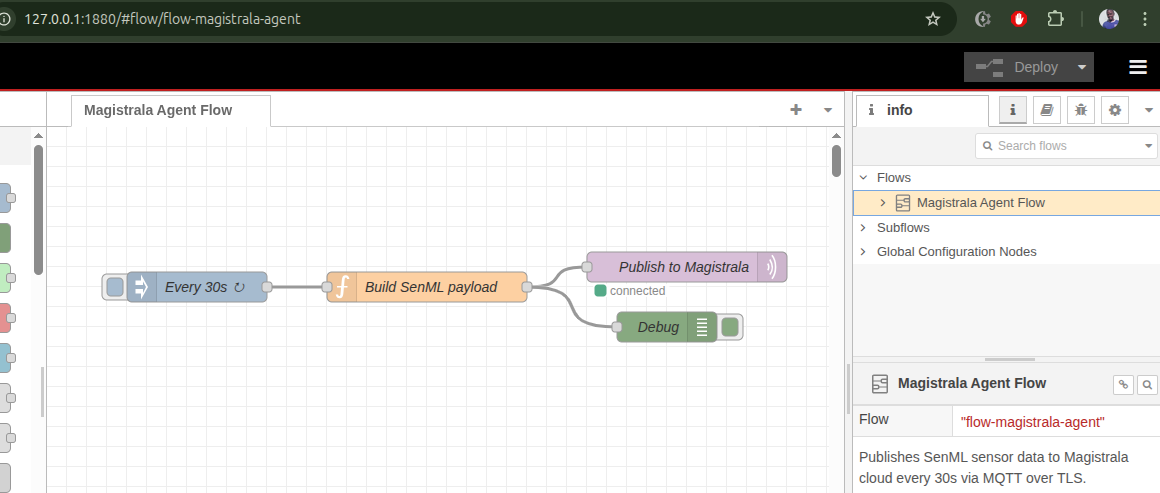
Within a minute you can confirm the data is arriving in Magistrala by opening the Messages view for your channel:
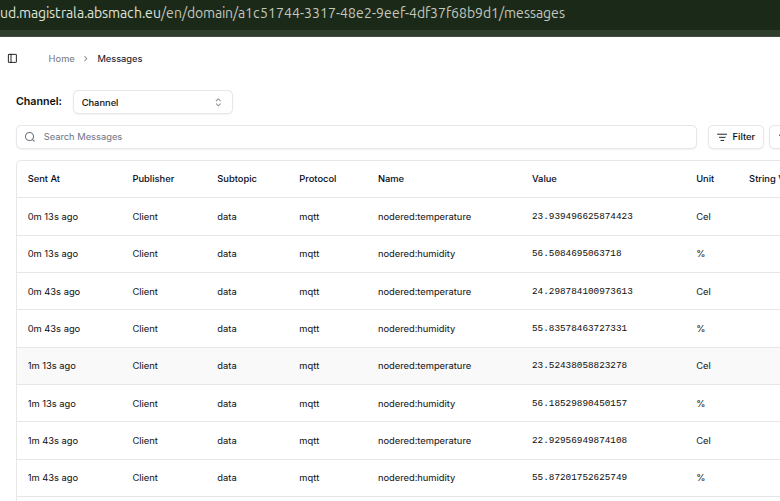
This verifies the full MQTT pipeline end-to-end before touching any deploy commands.
3. Verify everything is running
# Agent health
curl http://localhost:9999/health
Expected response:
{"status":"pass","version":"0.0.0","commit":"ffffffff","description":"agent service","build_time":"1970-01-01_00:00:00","instance_id":""}# Ping Node-RED via agent
curl -s -X POST http://localhost:9999/nodered \
-H 'Content-Type: application/json' \
-d '{"command":"nodered-ping"}'Expected response:
{"service":"agent","response":"..."}Deploying Flows via HTTP (Local)
The agent exposes an HTTP API on :9999 for local management. This is useful for testing from the same machine before moving to remote MQTT control.
Deploy a flow
First, base64-encode the flow JSON:
FLOWS=$(cat examples/nodered/speed-flow.json | base64 -w 0)Then send it to the agent. The agent decodes the flows, patches the MQTT client ID, and forwards them to Node-RED on its behalf:
curl -s -X POST http://localhost:9999/nodered \
  -H 'Content-Type: application/json' \
  -d "{\"command\":\"nodered-deploy\",\"flows\":\"$FLOWS\"}"
Expected response:
{
  "service": "agent",
  "response": ""
}
An empty response body is expected: Node-RED’s POST /flows returns 204 No Content on success.
Fetch current flows
curl -s -X POST http://localhost:9999/nodered \
  -H 'Content-Type: application/json' \
  -d '{"command":"nodered-flows"}'
Expected response (abbreviated):
{
  "service": "agent",
  "response": "[{\"id\":\"flow-speed\",\"type\":\"tab\",\"label\":\"Speed Sensor\",\"disabled\":false,\"info\":\"\"},...]\n"
}
The response field contains the raw JSON array of all deployed Node-RED flow objects.
Get runtime state
curl -s -X POST http://localhost:9999/nodered \
  -H 'Content-Type: application/json' \
  -d '{"command":"nodered-state"}'
Expected response:
{
  "service": "agent",
  "response": "{\"state\":\"start\"}\n"
}
"start" means all flows are active and running.
Deploying Flows via MQTT (from Magistrala Cloud)
This is the core use case: sending commands from the Magistrala cloud to the device over MQTT.
Single Channel, Three Subtopics
The agent uses a single Magistrala channel with three subtopics to separate concerns:
| Subtopic | Direction | Used by | Purpose |
|---|---|---|---|
m/<domain-id>/c/<channel-id>/req | Cloud → Device | Agent | Receives commands (deploy flows, fetch flows, exec, etc.) |
m/<domain-id>/c/<channel-id>/data | Device → Cloud | Node-RED | Publishes SenML telemetry upstream |
m/<domain-id>/c/<channel-id>/res | Device → Cloud | Agent | Publishes command responses back to the cloud |
The agent and Node-RED share the same channel but use different MQTT client IDs: <client-id> for the agent and <client-id>-nr for Node-RED. The -nr suffix is automatically patched into flows by the agent at deploy time, preventing session conflicts on the broker.
SenML command format
All agent commands use SenML JSON arrays:
[{"bn": "<request-id>:", "n": "<subsystem>", "vs": "<command>[,<payload>]"}]For Node-RED, n is nodered and vs is nodered-deploy,<base64-flow>.
Deploy a flow remotely
FLOWS=$(cat examples/nodered/modbus-flow.json | base64 -w 0)

mosquitto_pub \
  -h messaging.magistrala.absmach.eu -p 8883 \
  --capath /etc/ssl/certs \
  -I "Client" \
  -u <client-id> -P <client-secret> \
  -t "m/<domain-id>/c/<channel-id>/req" \
  -m "[{\"bn\":\"req-1:\", \"n\":\"nodered\", \"vs\":\"nodered-deploy,$FLOWS\"}]"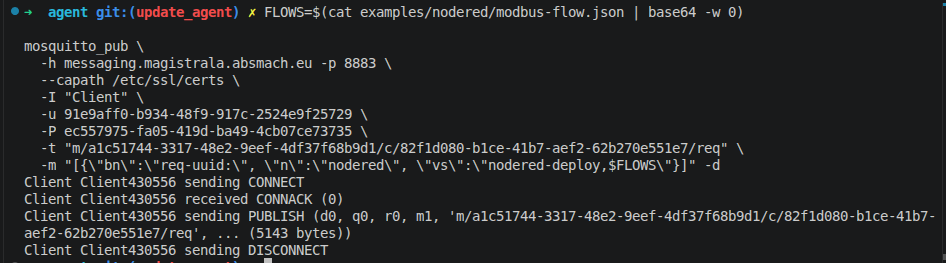
The debug output confirms the broker accepted the publish (CONNACK, PUBLISH, DISCONNECT). The agent publishes the result back to the res subtopic as SenML. Subscribe to see it:
mosquitto_sub \
  -h messaging.magistrala.absmach.eu -p 8883 \
  --capath /etc/ssl/certs \
  -I "Client" \
  -u <client-id> -P <client-secret> \
  -t "m/<domain-id>/c/<channel-id>/res"
Expected response on the res topic:
[{"bn":"req-1:","n":"nodered-deploy","t":1743580812.123,"vs":""}]Open Node-RED on port 1880 and you will see the new Modbus Holding Registers tab is now active:
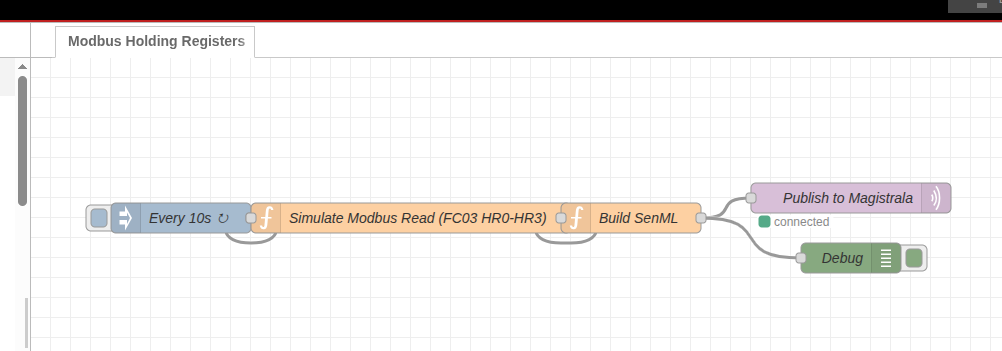
The flow immediately starts running. Check the Node-RED debug panel to confirm it is publishing SenML every 10 seconds:
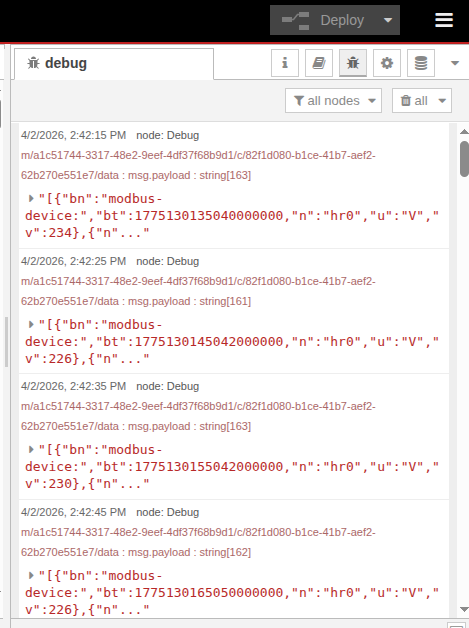
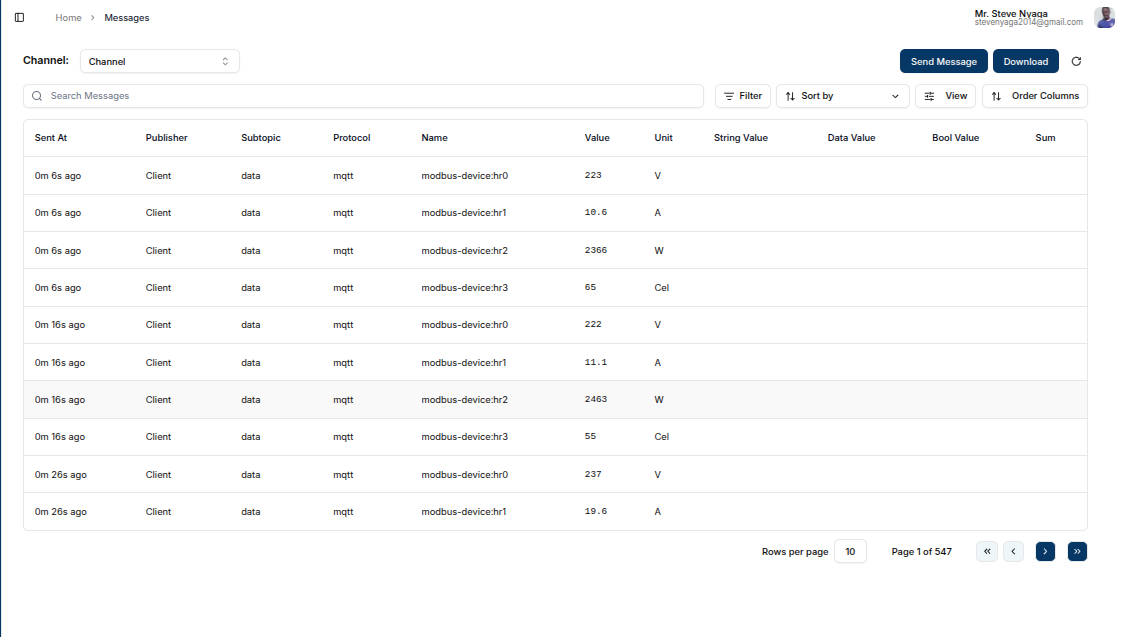
Backend confirmation --- the Magistrala Messages view shows all four holding-register readings arriving and being stored by the save_senml rule:
Fetch flows remotely
mosquitto_pub \
  -h messaging.magistrala.absmach.eu -p 8883 \
  --capath /etc/ssl/certs \
  -I "Client" \
  -u <client-id> -P <client-secret> \
  -t "m/<domain-id>/c/<channel-id>/req" \
  -m '[{"bn":"req-2:", "n":"nodered", "vs":"nodered-flows"}]'
Expected response on the res topic:
[{"bn":"req-2:","n":"nodered-flows","t":1743580820.456,"vs":"[{\"id\":\"flow-speed\",\"type\":\"tab\",...}]"}]The vs field contains the full flows JSON as a string.
What happens step by step
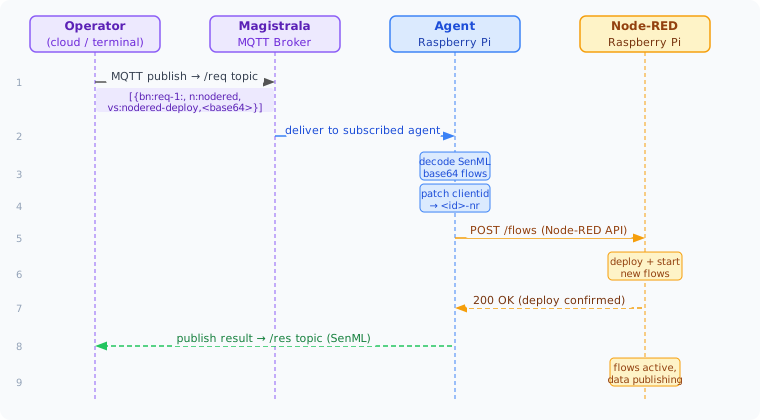
- Operator publishes a SenML command to the
reqtopic on Magistrala - Magistrala delivers it to the subscribed agent on the mock device
- Agent decodes the SenML payload and extracts the base64 flow JSON
- Agent patches the MQTT
clientidinside the flow to<client-id>-nr - Agent calls
POST /flowson Node-RED’s local REST API - Node-RED deploys the new flows and starts executing them
- Agent publishes the result back to the
restopic as SenML - Flows are now active and Node-RED begins publishing sensor data to the
datasubtopic
The Example Flows
Speed sensor (examples/nodered/speed-flow.json)
Simulates a speed/RPM/gear sensor publishing SenML every 15 seconds to m/<domain-id>/c/<channel-id>/data:
[
  {"bn": "speed-sensor:", "bt": 1743580800000000000,
   "n": "speed", "u": "km/h", "v": 87},
  {"n": "rpm",   "u": "rpm",  "v": 2340},
  {"n": "gear",              "v": 4}
]
Modbus holding registers (examples/nodered/modbus-flow.json)
Simulates polling 4 Modbus FC03 holding registers every 10 seconds:
| Register | Measurement | Unit |
|---|---|---|
| HR0 | Voltage | V |
| HR1 | Current (scaled ×10) | A |
| HR2 | Power | W |
| HR3 | Temperature | °C |
Published SenML:
[
  {"bn": "modbus-device:", "bt": 1743580800000000000,
   "n": "hr0", "u": "V",   "v": 231},
  {"n": "hr1", "u": "A",   "v": 14.2},
  {"n": "hr2", "u": "W",   "v": 3280},
  {"n": "hr3", "u": "Cel", "v": 47}
]
The Magistrala Rule Engine’s save_senml rule stores every message automatically.
Command Reference
| Command | HTTP payload | MQTT vs |
|---|---|---|
| Deploy flows | {"command":"nodered-deploy","flows":"<base64>"} | nodered-deploy,<base64> |
| Fetch flows | {"command":"nodered-flows"} | nodered-flows |
| Ping | {"command":"nodered-ping"} | nodered-ping |
| Runtime state | {"command":"nodered-state"} | nodered-state |
| Add single flow | {"command":"nodered-add-flow","flows":"<base64>"} | nodered-add-flow,<base64> |
Taking It to Real Hardware
The same stack runs unchanged on a real Raspberry Pi. Swap the Docker mock for the actual device:
- Build the agent binary for ARM:
GOARCH=arm64 make all - Copy
build/magistrala-agentandconfigs/config.tomlto the Pi - Install Node-RED on the Pi:
npm install -g --unsafe-perm node-red - Run the agent (it reads credentials from
config.tomlor environment variables) - For a real Modbus device: replace the simulation function node in
modbus-flow.jsonwith amodbus-readnode pointing to your device’s IP and port
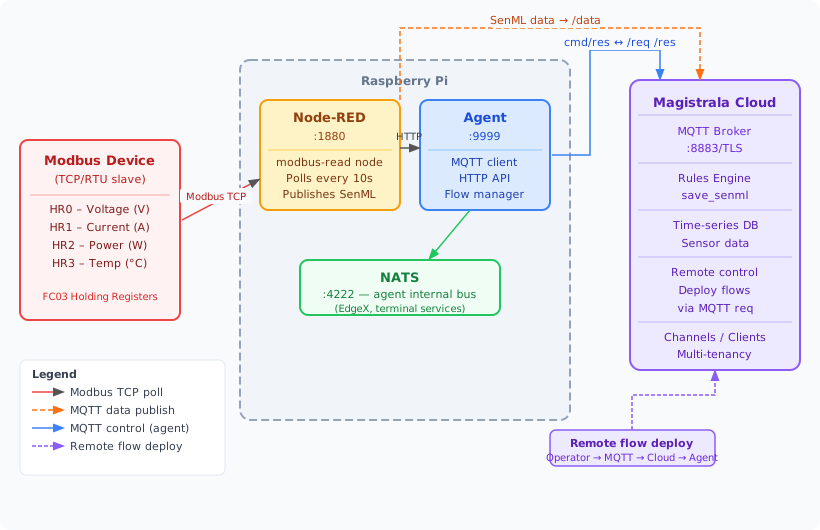
Provisioning, flow deployment, telemetry, and MQTT commands all work identically. The mock device exists precisely to let you validate the full integration locally before touching hardware.
Repository
The agent code, example flows, Docker Compose stack, and provisioning script are all available at: