Ready
Metadata plays a critical role in real-world IoT deployments.
Teams use metadata to store device attributes, environmental classifications, configuration flags, geographic data, and other contextual information that makes raw telemetry meaningful. As systems scale, metadata must be structured, queryable, and consistent across UI and API layers.
In earlier versions of the Magistrala UI, metadata was stored in a nested structure under a ui key.
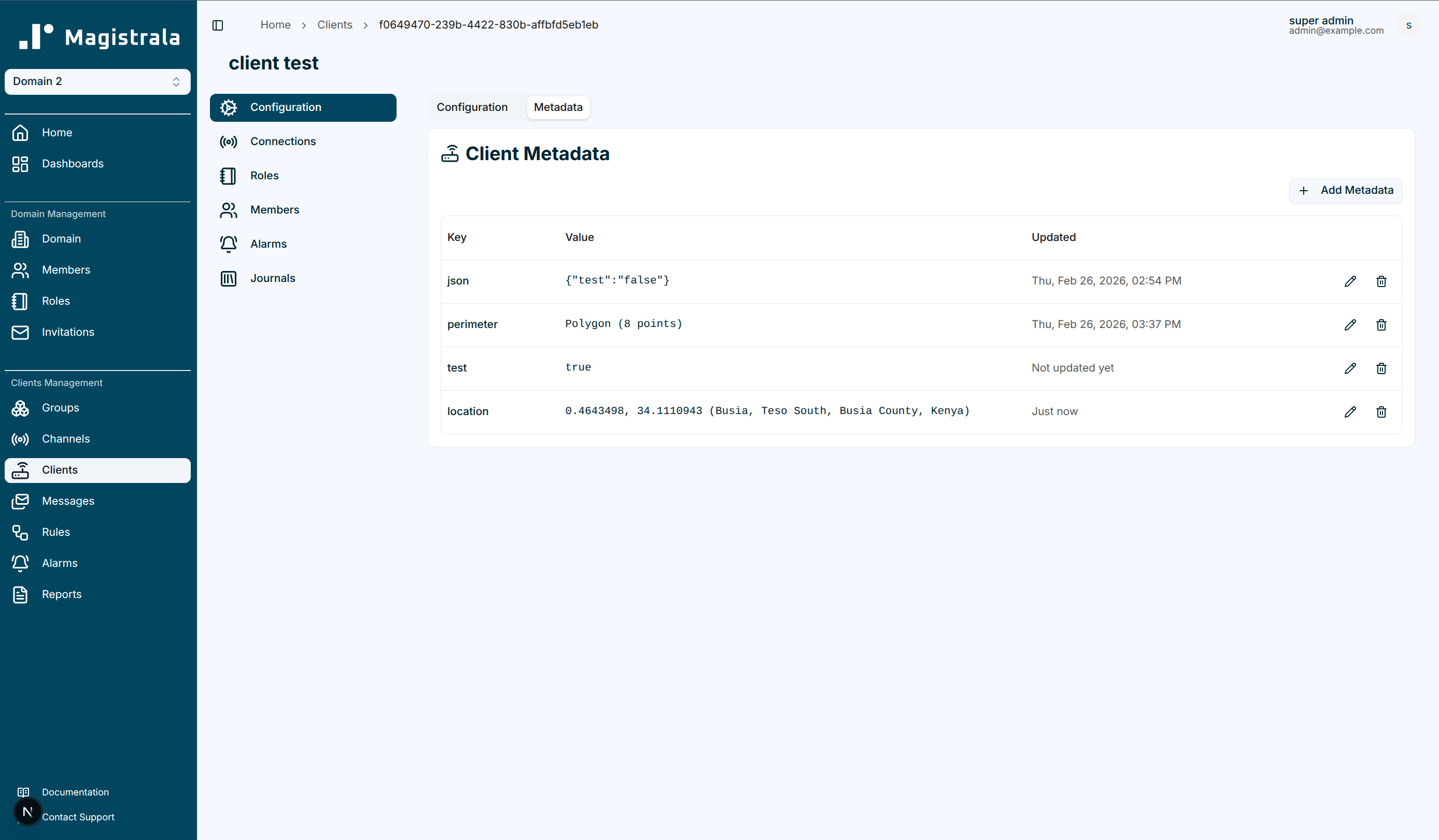
With Magistrala UI v0.19.0, we introduce a redesigned metadata system built around a flat structure, explicit typing, and per-field timestamps. This update improves clarity, type safety, and long-term maintainability and includes an automatic migration for existing deployments.
This post explains what changed, what qualifies as a breaking change, and what you need to do when upgrading.
Table of Contents
- Why the Metadata Redesign Matters
- Flat Storage Format (Breaking Change)
- Typed Metadata with Timestamps
- New Supported Value Types
- User Preferences Consolidated into Flat Metadata
- API and CLI Compatibility
- Migration Summary
- Conclusion
Why the Metadata Redesign Matters
As Magistrala deployments grow, metadata becomes more than just key-value storage. It enables:
- Device classification (e.g., production vs staging)
- Feature flags and configuration control
- Geographic visualization on dashboards
- Policy-driven automation
- Structured filtering and querying
The new format aligns metadata storage with structured application models, making it easier to extend and reason about.
This redesign improves:
- Type clarity
- UI consistency
- Upgrade flexibility
- Long-term data model stability
Flat Storage Format (Breaking Change)
Affects: Users upgrading from Magistrala UI v0.18.5 and earlier.
Previously, metadata managed via the UI was stored under a nested ui key for channels, clients, groups, domains, and plans:
{
  "ui": {
    "environment": {
      "value": "production",
      "type": "string",
      "updatedAt": "2025-06-01T00:00:00.000Z"
    }
  }
}
The new format stores entries directly at the top level of the metadata object:
{
  "environment": {
    "value": "production",
    "type": "string",
    "updatedAt": "2025-06-01T00:00:00.000Z"
  }
}
What changes: Metadata previously stored under the ui or admin sub-keys is automatically migrated to the flat format by the backend on upgrade. After upgrading to v0.19.0, all existing entries will appear directly at the top level.
What you need to do: Upgrade to Magistrala UI v0.19.0.
Typed Metadata with Timestamps
Each metadata entry is stored as an object with three fields:
value— the actual datatype— the declared type (see New Supported Value Types)updatedAt— ISO 8601 timestamp of the last update
{
  "environment": {
    "value": "production",
    "type": "string",
    "updatedAt": "2025-06-01T10:30:00.000Z"
  },
  "max_retries": {
    "value": 5,
    "type": "integer",
    "updatedAt": "2025-06-01T10:30:00.000Z"
  }
}
Existing entries stored as plain untyped values at the top level are handled automatically the UI infers the type on first load and treats them as valid entries. No manual action is required for these.
New Supported Value Types
| Type | Description | Example value |
|---|---|---|
string | Plain text | "production" |
integer | Whole number | 5 |
double | Decimal number | 3.14 |
boolean | True or false | true |
json | Arbitrary JSON object | {"threshold": 100, "unit": "ms"} |
location | Geographic point | {"latitude": -1.286, "longitude": 36.817, "address": "Nairobi"} |
perimeter | Polygon defined by coordinate list | {"coordinates": [[-1.28, 36.81], [-1.29, 36.82], [-1.28, 36.83]]} |
The location and perimeter types integrate directly with map visualizations in dashboards, enabling geographic filtering and display without additional configuration.
User Fields Moved to Flat Metadata
The subscribed flag was previously stored under a nested admin key in user metadata. With v0.19.0, it is stored directly in flat metadata.
| Field | Before | After |
|---|---|---|
| Email subscription flag | metadata.admin.subscribed | metadata.subscribed |
User preferences (language and theme) remain in private_metadata and are not affected by this change.
New user registrations now receive language and theme preset in private_metadata at the time of account creation.
API and CLI Compatibility
This change is UI-side only. The Magistrala API stores metadata as-is and has not changed.
After upgrading, the UI reads and writes directly to the top-level metadata object rather than the ui or admin sub-key. If you access metadata via the API or CLI directly, you will see the flat format reflected immediately after the first UI-side save on a given entity.
No API schema changes, no SDK updates, and no CLI flag changes are required to support this update.
Migration Summary
| Scenario | Action Required |
|---|---|
Entity metadata stored under ui key | Upgrade to v0.19.0 — backend migration handles it automatically |
User fields stored under admin key | Upgrade to v0.19.0 — backend migration handles it automatically |
| Plain (untyped) flat metadata values | Automatically handled — type is inferred by the UI |
| New deployments | No action required |
Conclusion
The metadata redesign removes an internal abstraction layer that was causing inconsistency between the UI and the raw API data model. All entities (channels, clients, groups, domains, plans, and users) now use the same flat, typed structure, making metadata easier to inspect, query, and manage across tools.
Existing entries stored under the ui or admin sub-keys are automatically migrated by the backend on upgrade. After upgrading to v0.19.0, your metadata will be consistently structured and fully aligned with the API representation.